Overview
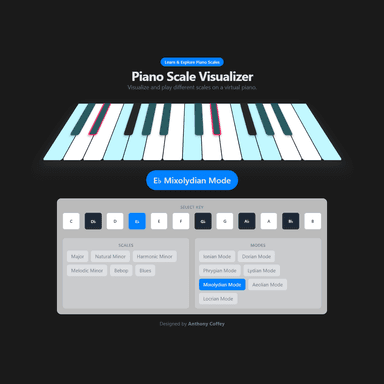
Piano Scale Visualizer is an interactive virtual piano in the browser. Pick a root key and a scale type, and the correct notes light up across the keyboard. Click any highlighted key to hear it. The target audience is musicians learning theory and composers looking for a quick reference across all 12 roots.
Motivation
A physical keyboard shows you the notes, but not which ones belong to a scale. Learning the pattern for D Dorian means memorizing an interval formula and mapping it by hand — or opening a chart. This tool makes the pattern visible instantly: change the root, change the scale, and the highlights update in real time.
Implementation
React renders an octave-spanning keyboard. Each key is a component that knows its note name and whether it is currently "active" (in the selected scale). When the root key or scale changes, a pure function computes the new set of active notes from an interval array:
activeNotes = intervals.map(semitones => (root + semitones) % 12)
Because the mapping is a pure function of (root, scale), there is no async work and no side effects — state management is a single useState pair. Howler.js plays the note sample when a highlighted key is clicked.
Scale Coverage
| Category | Scales |
|---|---|
| Common | Major, Natural Minor, Harmonic Minor, Melodic Minor |
| Pentatonic | Major Pentatonic, Minor Pentatonic |
| Blues | Blues |
| Modes | Dorian, Phrygian, Lydian, Mixolydian, Locrian |
What I Learned
Encoding music theory as interval arrays makes the implementation surprisingly clean. Every scale is just a list of semitone offsets from the root — [0, 2, 4, 5, 7, 9, 11] for major, [0, 2, 3, 5, 7, 9, 10] for Dorian, and so on. The formula (root + offset) % 12 handles octave wrapping. Because the core logic is a pure function, it was trivial to unit-test and trivial to extend with new scales.